The Same System, Every Screen:

Why Consistency Beats a Separate Mobile App

LinkedIn Link for Jamie Edwards
Author:

Jamie Edwards

Built Environment software does not happen at one desk anymore. Here is why a genuinely responsive system matters more than a stripped-down mobile companion app.

Think about how many different devices or screens a Built Environment officer touches in a single day. A desktop workstation first thing in the morning. A tablet on a site visit before lunch. A phone to check a case update on the way to a committee meeting.

Built Environment software does not happen at one desk anymore, and the systems officers rely on need to keep up with that reality, not fight against it.

Too often, they don’t. Many such systems were designed primarily for desktop use, with mobile access added later as an afterthought, a stripped-down companion app that handles a handful of basic tasks and little else. The result is a system that behaves like two different products depending on which screen you happen to be looking at.
The problem with inconsistent mobile experiences

When a system behaves differently on a phone or tablet than it does on a desktop, it creates friction exactly when officers can least afford it. A feature that works seamlessly in the office suddenly is not available on site. A workflow that takes three clicks at a desk takes twelve on a companion app, or is not possible at all, forcing the officer to make a note and finish the task later, back at their desk.

That is not flexible working; it is working around the system’s limitations.

This inconsistency also undermines adoption. Officers quickly learn which tasks are reliable on mobile and which are not, and they adjust their habits accordingly, often reverting to paper notes or waiting until they are back at a desktop. The investment in mobile capability goes underused, not because officers do not want it, but because it does not fully deliver what they need in the moment they need it.

What true responsive design delivers

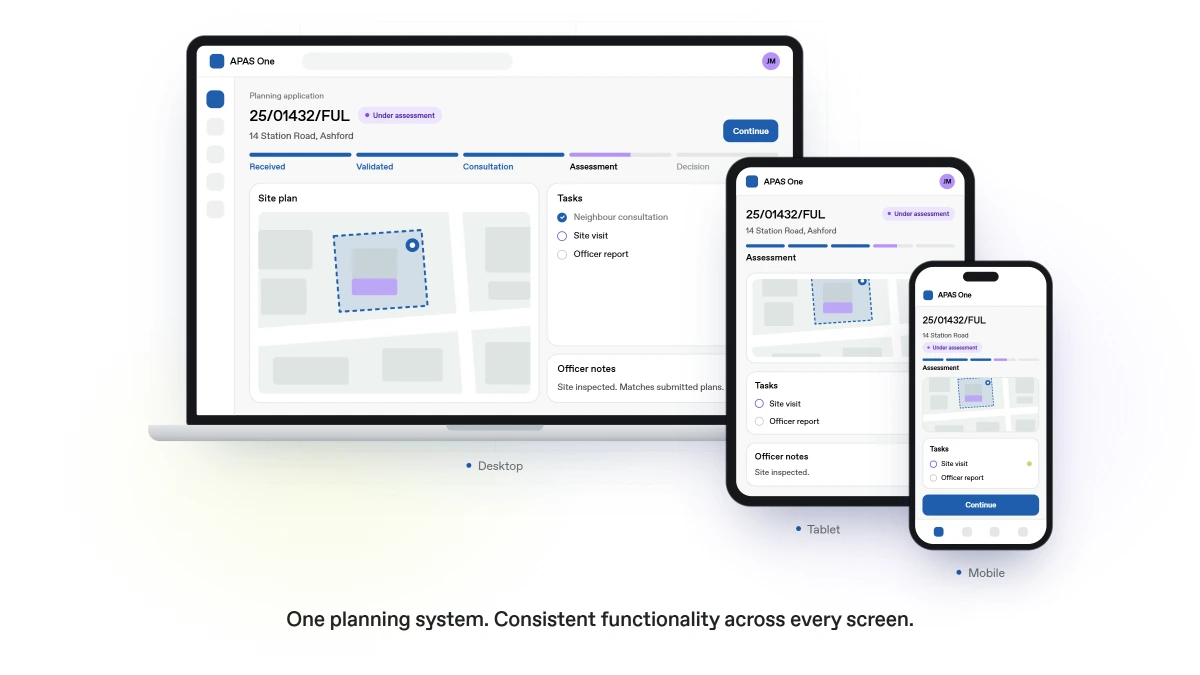
The alternative is not a separate mobile app at all. It is a single system, built to be genuinely responsive, that delivers the same interface and the same functionality regardless of the device it is running on. Whether an officer is plan checking or validating an application at a desktop, reviewing a site plan on a tablet during a consultation or inspection, or checking a case status on a phone between site visits, they should be looking at the same system, working the same way, with nothing missing.

This is a deliberate design principle behind APAS One. Rather than building a cut-down mobile companion, we built one platform that adapts naturally to the screen it is displayed on, desktop, tablet, or mobile, without compromising on functionality. What an officer can do at their desk, they can do in the field.

Of course, working in the field can also mean operating in areas where an internet connection is unavailable or unreliable. In those circumstances, our Mobile Working solution provides an additional layer of flexibility, enabling officers to continue working offline while on site. Information captured on the device is then automatically synchronised with the core APAS One system once an internet connection is restored.

This means mobile working is not limited to simply accessing the system on a smaller screen. Officers can work effectively across different devices and locations including situations where continuous connectivity cannot be guaranteed.

Why consistency reduces training and support overhead

There is a practical benefit here too, beyond day-to-day convenience. When a system works the same way everywhere, there is only one interface to learn, one set of workflows to train new starters on, and one set of behaviours for support teams to troubleshoot. Authorities that operate with a consistent, device-agnostic system typically see faster onboarding for new officers and fewer support queries related to why something doesn’t work the same way it does at their desk.

That consistency also matters for authorities moving toward more flexible and hybrid ways of working, where officers increasingly split their time between the office, home, and the field. A system that behaves predictably regardless of location and device removes one more barrier to that flexibility, rather than adding to it.

Productivity that follows the officer, not the desk

Ultimately, device compatibility is not a checkbox feature. It is directly connected to how productive an officer can be, particularly for roles that combine office-based casework with regular time in the field, enforcement, site visits/inspections, and community consultation among them. A system that only performs at a desk is a system that is only half doing its job.

Built Environment teams across departments such as Planning, Building Control etc. deserve technology that moves with them. That means the same system, the same functionality, and the same confidence, on every screen they use.